
- 01Email Breach Kya Hota Hai?
- 02HaveIBeenPwned — Sabse Trusted Tool
- 03Password Check — Kya Aapka Password Bhi Leaked Hai?
- 04Google Password Checkup
- 05Apple iPhone Users ke Liye — Built-in Security Recommendations
- 06Email Leaked Ho Jaaye — Kya Karein?
- 07HIBP Breach Alerts Subscribe Karna
- 08India-Specific Data Breaches — Kya Kya Leak Hua Hai?
Aaj ke digital zamane mein data breaches itni aam baat ho gayi hai ki shayad aapka email address already kisi hack mein expose ho chuka ho — aur aapko pata bhi na ho. Facebook, LinkedIn, Adobe, Zomato — in sabke massive data breaches ho chuke hain. Iss guide mein hum dekhenge kaise check karein ki aapka email leaked hai ya nahi, aur agar hai toh kya karna chahiye.
Email Breach Kya Hota Hai?
Jab koi website ya service hack hoti hai, toh hackers uske database se users ki information chura lete hain — email addresses, passwords, phone numbers, etc. Ye data phir dark web pe sell hota hai ya publicly leak ho jaata hai. Isse “data breach” kehte hain.
Apna email breach check karne ka sabse fast aur trusted tarika: haveibeenpwned.com pe jaao, apna email enter karo, aur check karo. Ye free tool hai Troy Hunt ka banaya hua — security industry ka gold standard.
HaveIBeenPwned — Sabse Trusted Tool
HaveIBeenPwned (HIBP) ek free website hai jo 12+ billion leaked accounts ka database maintain karti hai. Microsoft, Google, aur FBI bhi iss service ko recommend karte hain.
Kaise Use Karein
- Browser mein haveibeenpwned.com open karo
- Search box mein apna email address type karo
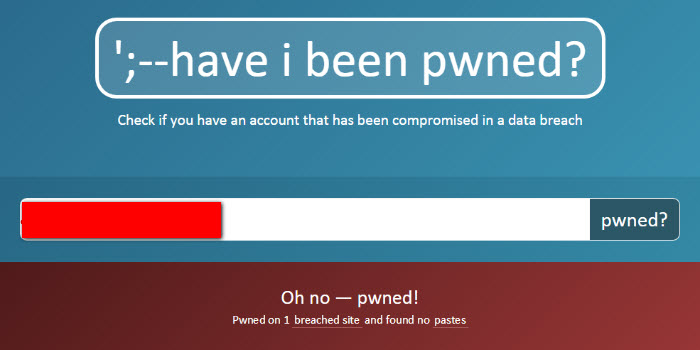
- “pwned?” button click karo
- Agar result green aaye — “Good news” — aapka email kisi known breach mein nahi mila
- Agar result red aaye — aapka email N breaches mein found hai — neeche details dikhegi
Red result aane pe HIBP exactly batata hai kaunsi companies ke breach mein aapka email tha, kab hua, aur kaunsa data expose hua (email, password, name, phone, etc.).
HIBP pe email enter karna safe hai — ye website sirf check karti hai ki aapka email unke database mein hai ya nahi. Aapka email store nahi kiya jaata search purpose ke liye. Site ka owner Troy Hunt ek renowned cybersecurity expert hain.
Password Check — Kya Aapka Password Bhi Leaked Hai?
HIBP ek aur powerful feature deta hai — Passwords check karna. Ye aapko batata hai ki aapka specific password ever breach database mein found hua hai ya nahi.
- haveibeenpwned.com/passwords pe jaao
- Apna password enter karo (ye securely hashed hota hai — actual password HIBP ke servers pe nahi jaata)
- Agar “oh no — pwned!” dikhe — iska matlab ye password compromised hai, use mat karo
- Agar “Good news” — ye password known breaches mein nahi mila
Important: Iska matlab sirf ye nahi ki “safe password hai” — weak passwords bhi ho sakte hain. Ye sirf check karta hai ki kisi ne ye exact password already use kiya tha aur wo breach mein tha.
Google Password Checkup
Agar aap Chrome use karte ho, toh Google ka built-in Password Checkup feature bhi bahut useful hai:
- Chrome browser mein passwords.google.com open karo
- “Go to Password Checkup” click karo
- Google automatically check karega ki aapke saved passwords kisi breach mein expose hue hain ya nahi
- Weak, reused, aur compromised passwords sab ek jagah dikhega
Ye feature Android phones mein bhi kaam karta hai — Settings → Google → Autofill → Passwords → Password Checkup.
Agar koi website ya app aapko bolti hai “apna current password enter karo taaki hum check karein ki ye safe hai” — ye almost certainly a scam ya phishing attempt hai. Sirf trusted tools (HIBP, Google, Apple) use karo. Kisi random site pe apna actual password mat dalo.
Apple iPhone Users ke Liye — Built-in Security Recommendations
iPhone/iPad users ko separately kuch check nahi karna — iOS mein ye feature built-in hai:
- Settings → Passwords pe jaao
- “Security Recommendations” section dekhoge
- Apple automatically dikhata hai kaunse passwords compromised breaches mein hain
- Warning icon wale passwords immediately change karo
Ye feature iOS 14 se available hai aur HIBP ke same database se data use karta hai — same information, built-in convenience.
Email Leaked Ho Jaaye — Kya Karein?
Agar aapka email kisi breach mein mila hai, toh ghabrana nahi hai — lekin kuch important steps lene chahiye turant:
Step 1: Us Service Ka Password Change Karo
HIBP jo service name batata hai, uss service pe jaao aur password immediately change karo. Strong, unique password use karo — kisi aur account pe same password mat rakho.
Step 2: Same Password Wale Baaki Accounts Check Karo
Agar aap same password multiple places pe use karte the — email, social media, banking — toh wo sab immediately change karo. Credential stuffing attacks mein hackers yahi karte hain: ek breach ka email+password dusri sites pe try karte hain.
Step 3: Two-Factor Authentication Enable Karo
Gmail, Facebook, Instagram, aur banking apps pe 2FA zaroor enable karo. Iske baad password know hone pe bhi account access nahi ho sakta bina aapke phone ke.
Step 4: Password Manager Use Karo
Har account ke liye alag strong password yaad rakhna impossible hai. Google Password Manager (free), Bitwarden (free, open-source), ya 1Password use karo. Ek master password yaad rakho, baaki sab manager manage kare.
✔ HIBP pe apna email check karo — free hai
✔ Breached service ka password turant change karo
✔ Same password use karte the? Wo sab bhi change karo
✔ 2FA enable karo — Gmail, Facebook, banking sab pe
✔ Password manager set up karo — Bitwarden ya Google Password Manager
✔ HIBP alerts subscribe karo — future breaches mein email aayega
HIBP Breach Alerts Subscribe Karna
HIBP ek useful feature deta hai — apna email register karo taaki future mein agar aapka email kisi naye breach mein found ho, aapko notification aaye:
- haveibeenpwned.com pe jaao
- “Notify me” section mein apna email enter karo
- Verification email aayega, confirm karo
- Ab jab bhi koi nayi breach hogi aur aapka email involved hoga — alert milega
India-Specific Data Breaches — Kya Kya Leak Hua Hai?
India mein bhi kai major data breaches ho chuke hain jo aapko affect kar sakte hain:
- Zomato (2017): 17 million users ki information leak
- MobiKwik (2021): 3.5 million users ka data dark web pe
- Air India (2021): 4.5 million passengers ka data
- BigBasket (2020): 20 million users ka data
- Domino’s India (2021): 180 million orders ka data leak
In sabka data HIBP aur aur databases mein available hai. Ek baar check zaroor karo.
Abhi haveibeenpwned.com pe jaao aur apna email check karo — 2 minute ka kaam hai aur results surprisingly shocking ho sakte hain. Prevention is always better than cure.
Aur Security Tips →