
Best Clipboard Manager for Mac in 2026 (Free & Paid)
Stop losing copied text — the best apps to keep a history of everything you copy on Mac
⚡ TL;DR — Top Picks
- Best free: Maccy — lightweight, keyboard-first, open source
- Best paid: Paste — beautiful design, iCloud sync across all Apple devices
- Best for power users: Alfred (with Powerpack) — clipboard + launcher + automation in one
- Best built-in option: Mac has no clipboard history — you need a third-party app
- All good clipboard managers store hundreds of previous copies and let you search them instantly
Mac’s built-in clipboard stores exactly one thing: whatever you copied last. Copy something new? The previous item is gone forever. For anyone doing serious work — writing, coding, research, customer support — this is a daily frustration.
A clipboard manager fixes this by keeping a history of everything you copy, searchable and accessible in seconds. It’s one of those tools that once you use it for a week, you can’t imagine working without it.
“A clipboard manager is one of those tools where after a week you wonder how you ever worked without it.”
Why Mac Doesn’t Have a Built-In Clipboard History
Apple has never added clipboard history to macOS — likely a privacy decision, since storing everything you copy means storing passwords, sensitive data, and private messages. The tradeoff is real: third-party clipboard managers need to be trusted with that data.
All the apps below store your clipboard history locally on your Mac by default. None of them send your clipboard data to external servers unless you explicitly enable sync features.
Best Free Clipboard Manager: Maccy
Maccy is the go-to recommendation for anyone who wants a clipboard manager without paying or fussing with configuration. It’s open source, lightweight (uses almost no RAM), and lives in your menu bar.
How it works: Press Shift + Command + C (customizable) and a dropdown appears showing your last 200 copied items. Type to search. Click or press Enter to paste. Done.
Key features:
- Stores up to 200 items (configurable)
- Search across all history instantly
- Keyboard-first — use it entirely without touching the mouse
- Paste as plain text (strips formatting) — incredibly useful
- Ignores password managers (won’t store 1Password/Keychain entries)
- Open source and free — download from maccy.app or GitHub
Best for: Writers, developers, and anyone who wants a simple, reliable clipboard history with no subscription.
Best Paid Clipboard Manager: Paste
Paste is the most polished clipboard manager on Mac — it looks and feels like an Apple-designed app. It stores your clipboard history in a beautiful grid view, syncs across all your Apple devices via iCloud, and lets you organize clips into pinboards.
Key features:
- Unlimited clipboard history
- iCloud sync — access your clipboard on Mac, iPhone, and iPad
- Pinboards — save frequently used snippets (templates, boilerplate text, addresses, etc.)
- Preview images, links, and files visually
- Quick paste with keyboard shortcut
- App filtering — exclude specific apps from being stored
Pricing: Paste costs around $2.99/month or $24.99/year. There’s a free trial.
Best for: Anyone who works across multiple Apple devices and wants their clipboard in sync everywhere.
Best for Power Users: Alfred with Powerpack
Alfred is a launcher app (like Spotlight, but far more powerful), and its Powerpack upgrade includes a clipboard history feature. If you’re already using Alfred as your launcher, the clipboard history integration makes it the most seamless option.
Key features:
- Clipboard history searchable from Alfred’s main search bar
- Snippets — expand short text codes into full templates (e.g., type
;email→ expands to your full email address) - Merge clipboard items — combine multiple copied items into one paste
- Works alongside Alfred’s file search, web search, and workflow automation
Pricing: Alfred is free; Powerpack is a one-time purchase of £34 (~$42).
Best for: Power users who want clipboard management as part of a broader productivity stack.
Other Good Options Worth Knowing
| App | Price | Standout Feature | Best For |
|---|---|---|---|
| Maccy | Free | Lightweight, keyboard-first | Most users ✅ |
| Paste | $2.99/mo | iCloud sync across Apple devices | Multi-device Apple users |
| Alfred + Powerpack | £34 one-time | Integrated launcher + snippets | Power users |
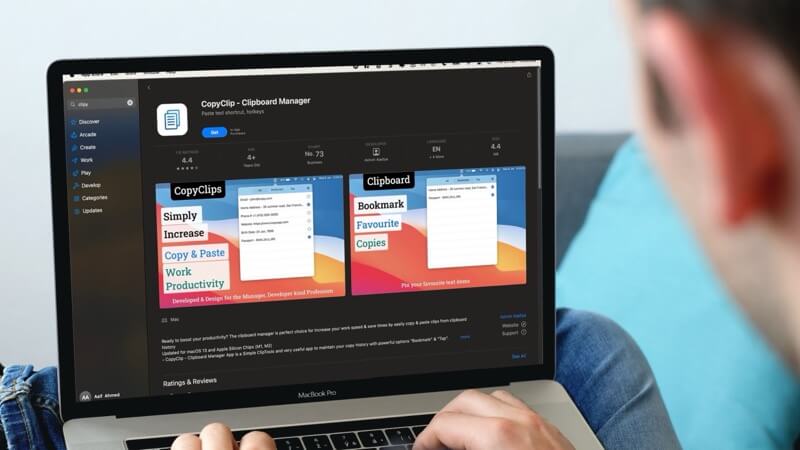
| CopyClip 2 | $7.99 | Simple, App Store, one-time buy | No-subscription preference |
| Raycast (free) | Free | Launcher + clipboard + extensions | Developers, Alfred alternative |
How to Use a Clipboard Manager Efficiently
- Use plain-text paste — most clipboard managers have a “paste without formatting” shortcut. Use it constantly when copying from web pages or PDFs into documents.
- Search before re-copying — instead of switching apps to copy something again, search your clipboard history. It’s almost always faster.
- Pin frequently used snippets — in apps that support it, pin your most-used text (email address, address, standard replies, code snippets) so they’re always at the top.
- Exclude sensitive apps — configure your clipboard manager to ignore your password manager (1Password, Bitwarden, etc.) so passwords are never stored in clipboard history.
💡 Raycast is a Free Alfred Alternative Worth Trying
Raycast has become hugely popular among developers as a free alternative to Alfred. It includes clipboard history, a snippet manager, file search, and a growing library of extensions — all free. If you don’t want to pay for Alfred’s Powerpack, try Raycast first.
🔗 More Mac Productivity Tips
Frequently Asked Questions
Does Mac have a built-in clipboard history?
No — macOS does not have a built-in clipboard history. The default clipboard only stores your most recently copied item. To get clipboard history on Mac, you need a third-party app like Maccy (free), Paste, or Alfred with Powerpack.
Is it safe to use a clipboard manager on Mac?
Yes, with a reputable app. All the apps listed here store your clipboard history locally on your Mac — nothing is sent to external servers unless you opt into sync features. Configure your clipboard manager to exclude password managers (1Password, Bitwarden, Keychain) to avoid storing sensitive credentials.
What’s the best free clipboard manager for Mac?
Maccy is the best free option — it’s open source, lightweight, keyboard-friendly, and does exactly what you need without bloat. Download it from maccy.app. Raycast is also excellent and free, with more features if you want a full launcher too.
Can I sync my clipboard history across my iPhone and Mac?
Yes — Apple’s built-in Universal Clipboard (part of Handoff) syncs your most recent copy between iPhone and Mac automatically, for a short window. For full history sync, Paste ($2.99/month) syncs your entire clipboard history across Mac, iPhone, and iPad via iCloud.
Will a clipboard manager slow down my Mac?
Good clipboard managers have minimal performance impact. Maccy uses very little RAM and CPU. Paste and Alfred are slightly heavier but still negligible on any modern Mac. None of them should cause noticeable slowdowns.
More Mac Productivity Tips
Simple tools that make your Mac genuinely faster to use — every week on Techtippr.