
- 01Quick Answer
- 02Sabse Pehle — Yeh Koi New Payment Network Nahi Hai
- 03Real Problem Kya Hai?
- 04Pay Karo Kaise Kaam Karta Hai?
- 05BHIM USSD (*99#) Kya Hai?
- 06Yeh App Kis Ke Liye Useful Hai?
- 07Companion App — Replacement Nahi
- 08Install Kaise Karein — Without Play Store
- 09Kya Yeh Offline Kaam Karta Hai?
- 10Security & Privacy
- 11Existing Competition Apps?
- 12Why We Built This
- 13Future Features We’re Exploring
- 14How To Use Pay Karo
- 15FAQ
- 16Final Thoughts
- 17Summary
UPI ne India mein payments ko genuinely easy bana diya hai.
Lekin ek problem abhi bhi bahut common hai:
“Bhai payment toh karna hai… par internet nahi chal raha.”
Aur honestly, yeh situation almost sabke saath hui hai.
- Basement parking mein network gaya
- Train ya highway par signal weak
- Concerts aur crowded places mein internet dead
- Small towns mein unstable connectivity
- Emergency mein bank app hi load nahi ho rahi
Aur phir wahi awkward moment:
“QR scan nahi ho raha… thoda hotspot dena.”
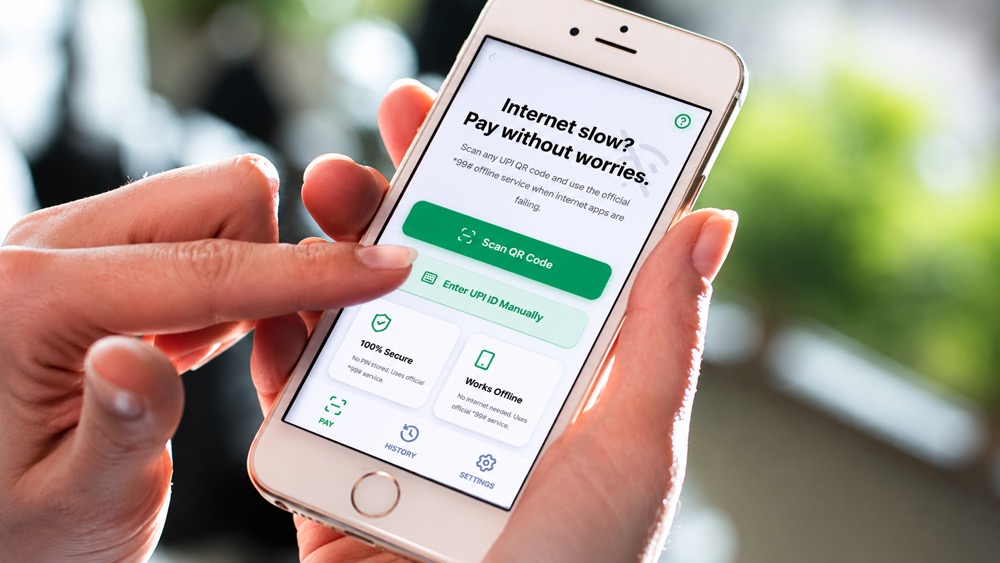
Isi real-life problem ko solve karne ke liye hum launch kar rahe hain Pay Karo — ek lightweight mobile-first companion web app jo aapko internet fail hone par bhi UPI payment karne mein help karta hai.
Try it here:
Quick Answer
Pay Karo ek mobile-first offline UPI helper hai jo QR code scan karke UPI ID extract karta hai aur India ke official BHIM USSD (*99#) service ke through internet ke bina payment karne mein help karta hai.
Features:
- ✅ QR scanner
- ✅ Offline UPI payment helper
- ✅ Works without internet
- ✅ No app install required
- ✅ Can be installed like an app (PWA)
- ✅ Uses official bank USSD service
- ✅ No UPI PIN stored
Sabse Pehle — Yeh Koi New Payment Network Nahi Hai
Important clarification.
Pay Karo koi naya payment gateway ya wallet nahi hai.
Aur yeh Google Pay, PhonePe, Paytm, ya BHIM ka replacement bhi nahi hai.
Yeh ek companion app hai.
Matlab:
Jab normal UPI apps internet issue ki wajah se struggle karein, tab Pay Karo aapko offline payment process tak quickly pahunchata hai.
Yeh India ke already existing:
BHIM USSD Service (*99#)
…ka use karta hai.
Agar aapko pata nahi:
India mein banks ka ek official offline banking/payment system hai jo *99# dial karke kaam karta hai.
Problem?
Most users ko:
- Is feature ke baare mein pata hi nahi
- Ya manually UPI ID type karna annoying lagta hai
- Ya QR code se UPI details extract karna nahi aata
Pay Karo wahi process simplify karta hai.
Real Problem Kya Hai?
UPI apps ka biggest dependency:
Internet.
Aapne notice kiya hoga:
- QR code scan ho gaya
- Amount bhi enter kar diya
- Lekin “Processing…”
- “Bank server unavailable”
- “Poor internet connection”
Aur phir line mein peeche khade log aapko dekh rahe hote hain jaise RBI governor aap hi ho.
Especially India mein:
- Metro stations
- Underground parking
- Rural areas
- Crowded festivals
- Cricket stadiums
- Railway stations
…mein network issues bahut common hain.
Pay Karo exactly isi edge-case ko target karta hai.
Pay Karo Kaise Kaam Karta Hai?
Simple flow:
Step 1: QR Code Scan Karo
App QR code scan karta hai.
Step 2: UPI Details Extract Hoti Hain
QR se:
- UPI ID
- Payee info
- Payment details
extract ho jaati hain.
Step 3: Official *99# Flow Trigger
App aapko BHIM USSD offline payment process tak guide karta hai.
Yeh internet ke bina cellular network par kaam karta hai.
Step 4: Payment Complete
Aap apne bank ke registered mobile number se payment authorize karte ho.
Done.
BHIM USSD (*99#) Kya Hai?
Bahut logon ko genuinely pata hi nahi hota ki:
India mein offline UPI-like banking ka official system already exist karta hai.
*99# Service:
NPCI-backed USSD banking service hai jo:
- Feature phones
- Low internet areas
- No-data situations
mein kaam karta hai.
Aap:
- Money send kar sakte ho
- Balance check kar sakte ho
- UPI PIN manage kar sakte ho
…without mobile internet.
Pay Karo isi official infrastructure ko easier banata hai.
Yeh App Kis Ke Liye Useful Hai?
🚕 Daily Commuters
Metro, train, underground parking.
🏕️ Travelers
Hill stations + poor network zones.
🛺 Auto & Local Vendors
Jahan internet inconsistent hota hai.
📱 Backup UPI Solution Chahiye?
Perfect companion tool.
👴 Less Technical Users
QR scan → guided process.
No complicated steps.
Companion App — Replacement Nahi
Yeh bahut important positioning hai.
Pay Karo:
- Bank nahi hai
- Wallet nahi hai
- Payment processor nahi hai
Yeh simply:
Offline payment workflow ko easier banata hai.
Aapka:
- Bank account
- Mobile number
- Existing UPI setup
same rehta hai.
Install Kaise Karein — Without Play Store
Yeh mera favorite part hai.
Pay Karo ek:
Progressive Web App (PWA)
hai.
Matlab:
- Play Store ki zarurat nahi
- App Store approval ka wait nahi
- Direct browser se install
Android Par:
- Open:
Pay Karo App - Chrome menu → “Add to Home Screen”
- Install
Bas.
Ab yeh almost normal app ki tarah behave karega.
iPhone Par:
- Safari mein site open karo
- Share button tap karo
- “Add to Home Screen”
Done.
Kya Yeh Offline Kaam Karta Hai?
Partially yes — intentionally.
UI aur core experience install hone ke baad lightweight feel karta hai.
Lekin actual payment authorization:
- Cellular network
- Official USSD banking
par depend karta hai.
Important difference:
Internet ≠ Cellular Network
Internet dead ho sakta hai…
Lekin GSM network available ho toh *99# kaam kar sakta hai.
Aur wahi iska main use-case hai.
Security & Privacy
Humne intentionally:
- No login
- No account creation
- No UPI PIN storage
approach rakha hai.
Important:
Pay Karo:
- Aapka UPI PIN store nahi karta
- Bank credentials save nahi karta
- Payment directly process nahi karta
Actual transaction bank/USSD flow ke through hota hai.
Existing Competition Apps?
Interesting part:
Dedicated offline UPI helper apps bahut kam hain.
Most payment apps:
- Internet-first hain
- Heavy apps hain
- Online APIs par dependent hain
Some banking apps USSD support indirectly dete hain, but:
- User experience confusing hota hai
- QR extraction simplified nahi hoti
- Offline-first workflow missing hota hai
Pay Karo ka focus:
“Offline payment assistance with minimum friction.”
Aur honestly, India jaise market mein yeh niche kaafi underrated hai.
Why We Built This
Techtip par hum generally:
- Practical tools
- Real-life tech solutions
- India-focused problems
solve karne ki koshish karte hain.
Aur yeh idea ek very common frustration se aaya:
“Payment karna hai… internet nahi chal raha.”
Itna simple.
Humne dekha:
UPI adoption toh huge hai…
Lekin backup systems ke baare mein awareness almost zero hai.
Toh socha:
Why not make that process easier?
Future Features We’re Exploring
Potential ideas:
- Offline payment guides
- Saved frequent UPI IDs
- SMS-based confirmations
- Smart QR parsing
- Multiple language support
- Emergency payment mode
- Nearby network diagnostics
- Voice-guided flow for elderly users
Still early days — but the idea has huge potential.
How To Use Pay Karo
Step 1:
Open:
Pay Karo — Offline UPI Helper
Step 2:
Tap:
- Scan QR Code
OR - Enter UPI ID manually
Step 3:
Follow guided payment flow.
Step 4:
Use official *99# banking service to complete transaction.
FAQ
Q1: Kya Pay Karo payment app hai?
Nahi. Yeh companion/helper app hai.
Q2: Kya internet ke bina kaam karta hai?
Haan — *99# USSD flow cellular network par kaam kar sakta hai even when internet apps fail.
Q3: Kya yeh safe hai?
App UPI PIN store nahi karta. Official banking USSD infrastructure use hota hai.
Q4: Kya Play Store se install karna padega?
Nahi. Browser se directly install ho sakta hai.
Q5: Kya iPhone par bhi kaam karega?
Haan — Safari se Add to Home Screen use kar sakte ho.
Final Thoughts
India mein UPI amazing hai.
Lekin:
“No internet = no payment”
…still a very real problem hai.
Pay Karo us problem ka simple, lightweight, practical solution banne ki koshish karta hai.
Not flashy.
Not complicated.
Not another wallet.
Just:
A smart backup tool when your internet gives up on you at the worst possible moment.
Try it here:
Summary
✅ Offline UPI helper
✅ Uses official BHIM USSD (*99#)
✅ QR scanner included
✅ Works when internet apps fail
✅ Installable without Play Store
✅ Mobile-first lightweight app
✅ No PIN storage
✅ Built for real Indian payment problems
Next time internet bole:
“Aaj mera mood nahi hai.”
…hopefully your payment still goes through. 😄