
- 01Thermal Printer Kya Hota Hai?
- 02Thermal Printer Kaise Kaam Karta Hai?
- 03Cloud Kitchen ke liye Thermal Printer Kyu Useful Hai?
- 04Small Shops ke liye Thermal Printer Kyu Useful Hai?
- 05Receipt Printer vs Label Printer vs Regular Printer
- 06Thermal Printer Ka Use Kaise Karein?
- 07Thermal Printer Kharidte Waqt Kin Cheezon ka Dhyan Rakhein?
- 08Cloud Kitchen ke liye Practical Thermal Printer Use Ideas
- 09Small Shop ke liye Practical Use Ideas
- 10Kya ₹2,500 ke Around Thermal Printer Worth It Hai?
- 11Common Mistakes Jo Avoid Karni Chahiye
- 12Final Recommendation
- 13Where to Buy Thermal Printer?
Agar aap cloud kitchen, small shop, retail counter, food delivery business, grocery store, cafe, bakery, pharmacy, salon, ya online selling ka kaam kar rahe hain, to ek thermal printer aapke daily workflow ko kaafi easy, fast aur professional bana sakta hai.
Aaj ke time par business sirf product ya food quality se nahi chalta. Presentation, speed, order management, billing, labeling aur customer experience bhi utna hi important hai. Isi jagah par ek compact thermal printer ka role aata hai.
Thermal printer ki sabse badi khasiyat ye hoti hai ki isme ink ya toner ki zarurat nahi hoti. Normal printer me cartridge, ink refill, paper alignment, maintenance aur printing cost ka tension hota hai. Lekin thermal printer me bas thermal paper roll ya label roll lagta hai aur printer heat ke through printing karta hai.
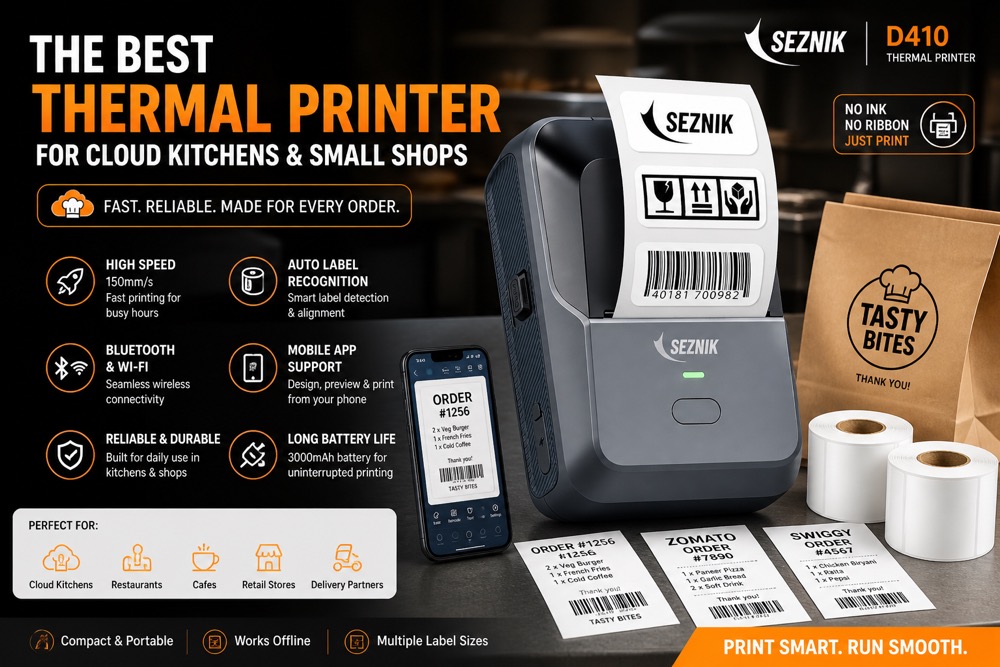
Agar aap Amazon par budget range me thermal printer dekh rahe hain, to around ₹2,500 ke range me kaafi useful options mil jaate hain. Price time ke saath change ho sakta hai, lekin entry-level business use ke liye ye ek practical investment hai.
Recommended Thermal Printer Deal
Cloud kitchen, small shop, billing aur label use ke liye budget-friendly thermal printer check kar sakte hain.
Affiliate link: Agar aap is link se buy karte hain, hume small commission mil sakta hai, bina aapke extra cost ke.
Thermal Printer Kya Hota Hai?
Thermal printer ek aisa printer hota hai jo normal ink printer ki tarah ink cartridge use nahi karta. Ye printer special thermal paper ya thermal label roll par heat apply karke text, barcode, QR code, billing details, order slips, price tags ya shipping labels print karta hai.
Simple words me:
Iska use aapne already bahut jagah dekha hoga:
- Restaurant bills
- Zomato/Swiggy order slips
- Grocery store receipts
- Pharmacy bills
- Courier/shipping labels
- Barcode labels
- Kitchen order tickets
- Price tags
- Token slips
- Parking receipts
Thermal printers chhote, fast aur low-maintenance hote hain. Isi wajah se small businesses ke liye ye kaafi popular hain.
Thermal Printer Kaise Kaam Karta Hai?
Thermal printer ke andar ek thermal print head hota hai. Jab aap print command dete hain, print head paper ke selected area ko heat karta hai. Thermal paper heat ke contact me aate hi dark ho jata hai aur text ya image appear ho jati hai.
Isliye isme ink ki zarurat nahi hoti.
Agar printer receipt printer hai, to usme receipt roll chalega. Agar label printer hai, to usme sticker label roll chalega.
Cloud Kitchen ke liye Thermal Printer Kyu Useful Hai?
Agar aap cloud kitchen run kar rahe hain, to thermal printer almost daily-use tool ban sakta hai. Chahe aap Zomato/Swiggy par listed hain, WhatsApp orders lete hain, ya apni website/app se direct orders accept karte hain, printer aapke operations ko professional bana deta hai.
1. Order Slips Print Karna Easy Ho Jata Hai
Cloud kitchen me order aate hi staff ko clear information chahiye hoti hai:
- Customer name
- Order items
- Quantity
- Special instructions
- Delivery partner details
- Payment mode
- Order time
- Token/order number
Agar ye information mobile screen par dekh kar cook ko batani padti hai, to mistake hone ke chances badh jaate hain. Lekin agar order slip print ho jaye, to kitchen team easily follow kar sakti hai.
Order #1042
Chicken Biryani — 2
Mutton Korma — 1
Extra Raita — 1
Instruction: Less spicy
Payment: Paid Online
Ye slip kitchen counter par lag sakti hai aur team ko clarity milti hai.
2. Packing Labels Professional Lagte Hain
Cloud kitchen me packaging presentation bahut important hoti hai. Agar aap container par handwritten sticker lagate hain, to wo thoda unprofessional lag sakta hai. Thermal label printer se aap clean labels print kar sakte hain:
- Chicken Biryani
- Mutton Korma
- Paneer Kadhai
- Raita
- Salad
- Order number
- Date/time
- “Consume fresh”
- “Contains dairy”
- “Spicy”
Customer jab neatly labeled packaging dekhta hai, to brand perception improve hota hai.
3. Wrong Item Packing Ka Risk Kam Hota Hai
Cloud kitchen me sabse common problem hoti hai: wrong item pack ho jana. Agar biryani, gravy, roti, raita, dessert sab alag containers me ja rahe hain, to confusion ho sakta hai.
Thermal labels se har container clearly identify ho jata hai. Ye especially helpful hai jab:
- Multiple orders same time par aa rahe hon
- Staff new ho
- Menu me similar items hon
- Combo orders handle karne hon
- Party/Daawat packages dispatch karne hon
4. Delivery Apps ke liye Useful
Zomato/Swiggy orders me printed order slips kaafi useful hote hain. Kai kitchens mobile se order dekhte hain, lekin printed slip se workflow better hota hai. Order accept karne ke baad slip print karke kitchen counter par rakh do. Team ko baar-baar phone check nahi karna padega.
Aap slip ko packaging ke saath bhi attach kar sakte hain, jisse delivery partner aur customer dono ko clarity milti hai.
5. Own App / WhatsApp Orders ke liye bhi Kaam Aata Hai
Agar aap apni website, PWA, WhatsApp ya Instagram DM se orders lete hain, to thermal printer aur bhi useful ho jata hai. Aap manually order details copy karke print kar sakte hain, ya agar aapka system supported hai, to direct print bhi kar sakte hain.
Small Shops ke liye Thermal Printer Kyu Useful Hai?
Thermal printer sirf restaurants ya cloud kitchens ke liye nahi hai. Ye small shops ke liye bhi kaafi useful hai.
1. Fast Billing
Grocery store, stationery shop, mobile accessories shop, salon, cafe, bakery, pharmacy ya general store me billing speed important hoti hai. Customer wait nahi karna chahta. Thermal printer fast receipt print karta hai, jisse checkout process smooth ho jata hai.
2. Ink Cost Nahi
Normal printer me ink khatam hone ka tension hota hai. Thermal printer me ink nahi lagti. Bas paper roll replace karna hota hai. Isse running cost predictable hoti hai.
3. Compact Size
Small shop counters par space limited hota hai. Thermal printers usually compact hote hain, isliye counter par easily fit ho jate hain.
4. Price Tags aur Product Labels
Agar printer label support karta hai, to aap product stickers, barcode labels, shelf labels aur price tags bhi print kar sakte hain. Ye small retail shops ke liye useful hai.
5. Professional Impression
Printed bill dena customer ko trust feel karata hai. Chahe business chhota ho, printed receipt brand ko organized aur professional dikhata hai.
Receipt Printer vs Label Printer vs Regular Printer
Thermal printer kharidne se pehle ye confusion clear karna zaruri hai: receipt printer, label printer aur regular ink printer alag use-cases ke liye hote hain.
| Printer Type | Best For | Pros | Limitations |
|---|---|---|---|
| Receipt Thermal Printer | Bills, receipts, order slips, kitchen tickets | Fast, compact, no ink, good for billing counters | Usually not ideal for sticker labels |
| Label Thermal Printer | Food labels, shipping labels, barcode labels, price stickers | Professional labels, useful for packaging and inventory | Not always good for long bills/receipts |
| Regular Ink Printer | A4 invoices, color prints, posters, menus | Color printing, flexible paper size | Ink cost, slower printing, more maintenance |
Thermal Printer Ka Use Kaise Karein?
Thermal printer use karna usually simple hota hai. Basic steps ye hain:
Step 1: Printer Unbox Karein
Box me usually printer, power adapter/USB cable, manual aur kabhi-kabhi sample paper roll milta hai. Pehle check karein ki sab accessories included hain.
Step 2: Paper Roll ya Label Roll Lagayein
Printer ka top cover open karein. Thermal paper roll ko correct direction me place karein. Paper ka printable side correct hona chahiye. Agar print blank aa raha hai, to paper direction wrong ho sakti hai.
Step 3: Connectivity Setup Karein
Printer model ke hisaab se connectivity options ho sakte hain:
- USB
- Bluetooth
- WiFi
- LAN
- Mobile app support
Agar aap PC billing software use karte hain, to USB printer kaafi stable hota hai. Agar mobile se print karna hai, to Bluetooth printer useful hota hai. Agar multiple devices se print karna hai, WiFi/LAN better ho sakta hai.
Step 4: App ya Software Install Karein
Kai thermal printers apni companion app ke saath aate hain. Kuch generic ESC/POS supported hote hain, jo billing software ke saath kaam karte hain.
Before buying, check karein:
- Android support hai?
- iPhone support hai?
- Windows support hai?
- Mac support hai?
- POS software compatible hai?
- Zomato/Swiggy order printing workflow possible hai?
Step 5: Test Print Karein
Setup ke baad ek test print karein. Agar text clear aa raha hai, paper align hai aur size sahi hai, to printer ready hai.
Step 6: Daily Workflow Set Karein
Cloud kitchen ke liye aap ye simple workflow follow kar sakte hain:
- Order receive hua
- Order details confirm ki
- Kitchen slip print ki
- Food prepare hua
- Packing labels print kiye
- Container par labels lagaye
- Final order verify kiya
- Delivery partner ko handover kiya
Ye process simple lagta hai, lekin daily operations me kaafi mistakes reduce karta hai.
Thermal Printer Kharidte Waqt Kin Cheezon ka Dhyan Rakhein?
Thermal printer buy karte waqt sirf price mat dekhiye. Ye points zarur check karein.
1. Aapka Use-Case Clear Hona Chahiye
Sabse pehle decide karein:
- Aapko bills print karne hain?
- Food labels print karne hain?
- Shipping labels print karne hain?
- Barcode print karna hai?
- Mobile se print karna hai?
- Computer billing software se print karna hai?
Use-case clear hoga to wrong printer kharidne ka risk kam hoga.
2. Print Width Check Karein
Common thermal printer sizes:
- 58mm receipt printer
- 80mm receipt printer
- 4-inch shipping label printer
- Small sticker label printer
Cloud kitchen order slips ke liye 58mm ya 80mm enough ho sakta hai. Shipping labels ke liye wider printer chahiye hota hai.
3. Connectivity Important Hai
Agar aap mobile-only setup chala rahe hain, Bluetooth useful hai. Agar shop counter par computer hai, USB stable hai. Agar multiple devices se print karna hai, WiFi better ho sakta hai.
4. Paper/Label Roll Availability
Printer sasta ho sakta hai, lekin uska roll easily available hona chahiye. Amazon, local market ya stationery supplier par compatible rolls mil rahe hain ya nahi, ye check karein.
5. Print Quality
Receipt ke liye basic quality enough hoti hai, lekin labels aur barcode ke liye sharp print important hai. Barcode blur hua to scanner read nahi karega.
6. Speed
Busy shop ya cloud kitchen ke liye print speed matter karti hai. Slow printer peak hours me irritating ho sakta hai.
7. App Support
Agar printer mobile app se work karta hai, to app ratings aur reviews bhi check karein. Kai baar hardware thik hota hai, lekin app poor hoti hai.
8. Customer Reviews
Amazon reviews me dekhein:
- Print quality kaisi hai?
- Bluetooth stable hai?
- Paper roll easily milta hai?
- Setup easy hai?
- Business use ke liye reliable hai?
- Warranty/service kaisi hai?
9. Return Policy
Budget printers me compatibility issue aa sakta hai. Isliye return/replacement policy check karke hi order karein.
Cloud Kitchen ke liye Practical Thermal Printer Use Ideas
Agar aap food business chala rahe hain, to thermal printer ka use sirf bill tak limited mat rakhiye. Aap ise branding aur operations dono ke liye use kar sakte hain.
Food Container Labels
Har container par item name print karein. Example: Chicken Biryani, Mutton Korma, Paneer Kadhai, Raita, Kheer, Salad.
Combo Order Labels
Agar aap Daawat package ya combo meals sell karte hain, to har packet par combo name print kar sakte hain.
Example:
Mini Daawat for 4–5
Order #204
Includes: Biryani, Korma, Roti, Raita, Salad, Dessert
Freshness Labels
- Packed fresh
- Consume within 2 hours
- Keep refrigerated
- Reheat before eating
- Prepared by Taste of Mughlai
Small Shop ke liye Practical Use Ideas
Small shops me thermal printer se ye kaam kiye ja sakte hain:
- Daily billing
- Customer receipts
- Item price tags
- Barcode labels
- Return/exchange slips
- Token slips
- Queue numbers
- Repair job cards
- Payment confirmation slips
Example: Mobile repair shop me customer ka phone receive karte waqt ek job slip print ho sakti hai. Grocery shop me quick bill generate ho sakta hai. Bakery me box par item label print ho sakta hai.
Kya ₹2,500 ke Around Thermal Printer Worth It Hai?
Agar aap daily orders ya billing handle karte hain, to haan, ₹2,500 ke around thermal printer worth it ho sakta hai.
Aap sochiye:
- Ink ka kharcha nahi
- Printing fast
- Counter professional lagta hai
- Order mistakes reduce hoti hain
- Packaging better dikhti hai
- Staff ko clarity milti hai
- Customer ko printed proof milta hai
Common Mistakes Jo Avoid Karni Chahiye
1. Wrong Printer Type Buy Karna
Receipt printer le liya, lekin kaam label printing ka tha. Ya label printer le liya, lekin need billing receipt ki thi. Pehle use-case confirm karein.
2. Connectivity Ignore Karna
Printer USB-only hai aur aap mobile se print karna chahte hain. Ye problem create karega. Connectivity pehle check karein.
3. Roll Size Check Na Karna
Har printer me har roll fit nahi hota. Compatible paper/label size check karna zaruri hai.
4. Reviews Na Padhna
Budget printers me quality vary kar sakti hai. Real user reviews zarur dekhein.
5. App Compatibility Ignore Karna
Agar printer ka app weak hai ya phone support nahi karta, to daily use frustrating ho sakta hai.
Final Recommendation
Agar aap cloud kitchen, small shop, cafe, bakery, grocery store, delivery kitchen, WhatsApp order business ya online selling ka kaam kar rahe hain, to ek thermal printer aapke business ko more organized aur professional bana sakta hai.
Ye koi fancy gadget nahi hai, balki daily operations ka practical tool hai. Ek simple thermal printer se aap:
- Order slips print kar sakte hain
- Bills generate kar sakte hain
- Food containers label kar sakte hain
- Packaging mistakes reduce kar sakte hain
- Customer experience improve kar sakte hain
- Staff workflow better bana sakte hain
Agar aapka budget around ₹2,500 hai, to entry-level thermal printer se start karna smart move ho sakta hai. Bas kharidne se pehle ye confirm kar lein ki printer aapke use-case ke according hai: receipt printing, label printing, Bluetooth, USB, WiFi, Android/iPhone support, paper roll size, aur app compatibility.
Where to Buy Thermal Printer?
Aap thermal printer Amazon par easily buy kar sakte hain. Amazon par different brands, sizes aur connectivity options available hote hain. Price time ke saath change ho sakta hai, isliye latest price, reviews aur features check karke order karein.
Best Thermal Printer Deal for Cloud Kitchens & Small Shops
Billing, receipts, labels aur daily order management ke liye budget thermal printer check karein.
Affiliate disclosure: Ye affiliate link hai. Agar aap is link se buy karte hain, hume small commission mil sakta hai.
Agar aap cloud kitchen ya small shop ke liye printer le rahe hain, to meri recommendation hai ki sirf cheapest option na dekhein. Wo printer choose karein jo aapke workflow ke saath match kare:
- Billing ke liye receipt printer
- Packaging ke liye label printer
- Mobile use ke liye Bluetooth
- Counter setup ke liye USB
- Multi-device setup ke liye WiFi/LAN
Sahi printer choose karne se aapka business zyada smooth, fast aur professional lagega.